

opening
製作 opening.geojson
製作 opening.geojson 需要從 JOSM 開始,通常這時候已經做完 level.geojson & unit.geojson 了,因此可以直接在 JOSM 中開啟這些檔案,並且在 JOSM 中繪製出入口的位置。
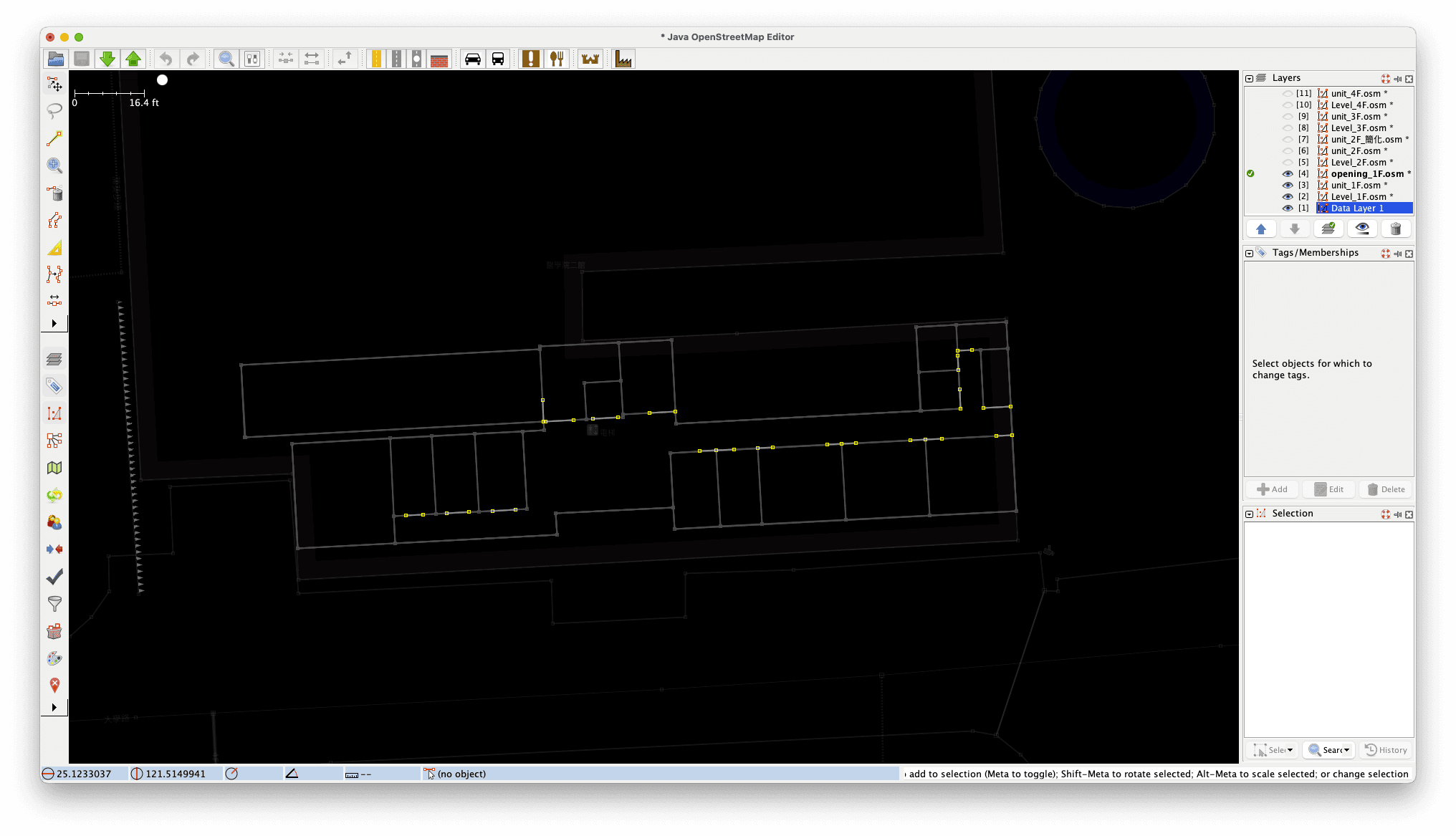
在 JOSM 中繪製出入口
在 JOSM 中要把所有出入口的位置標示出來,以線段的方式繪製 (快捷鍵: A),並且如果該樓層有電梯、樓梯、電扶梯等設施,也要確保這些設施的出入口都與人行區域之間有出入口標示。如果繪製的樓層是該建築物的一樓,別需繪製與室外連接的出入口,這些出入口的類別必須標示成 pedestrian.principle (IMDF Sandbox 中顯示 pedestrian principle)。
{
  "type": "Feature",
  "id": "5b8e0a35-0fbf-4ae6-aed0-fd985b7aea37",
  "feature_type": "opening",
  "properties": {
    "category": "pedestrian",
    "accessibility": null,
    "access_control": null,
    "door": null,
    "name": null,
    "alt_name": null,
    "display_point": {
      "type": "Point",
      "coordinates": [-123.4304217, 48.6405852]
    },
    "level_id": "2c4739db-c23c-414d-bdd8-ae54dc97c02f"
  },
  "geometry": {
    "type": "LineString",
    "coordinates": [
      [-123.4304155, 48.6405846],
      [-123.4304278, 48.6405859]
    ]
  }
}
{
"type": "Feature",
"id": "661da5e3-d419-4749-8133-f75c9ac01e86",
"feature_type": "opening",
"properties": {
"category": "pedestrian.principal",
"accessibility": null,
"access_control": null,
"door": null,
"name": null,
"alt_name": null,
"display_point": {
"type": "Point",
"coordinates": [121.5156311, 25.1227732]
},
"level_id": "bdc3f53d-85b3-49b7-a8a5-59db2433dbf8"
},
"geometry": {
"type": "LineString",
"coordinates": [
[121.5156214, 25.1227727],
[121.5156407, 25.1227736]
]
}
}
匯出 opening.osm 並轉換成 geojson
匯出 opening.osm 後,使用 osmtogeojson 這個線上工具將 opening.osm 轉換成 geojson。
<?xml version='1.0' encoding='UTF-8'?>
<osm version='0.6' generator='JOSM'>
  <node id='-31738' action='modify' visible='true' lat='25.12279073139' lon='121.51612223234' />
  <node id='-31739' action='modify' visible='true' lat='25.12280323507' lon='121.51612150306' />
  <node id='-31740' action='modify' visible='true' lat='25.12281545215' lon='121.51612080458' />
  <node id='-31741' action='modify' visible='true' lat='25.12282450884' lon='121.51612027701' />
  <node id='-31742' action='modify' visible='true' lat='25.12282772279' lon='121.51612008912' />
  <node id='-31743' action='modify' visible='true' lat='25.12282818954' lon='121.51613001282' />
  <node id='-31744' action='modify' visible='true' lat='25.12279095399' lon='121.51613828915' />
  <node id='-31745' action='modify' visible='true' lat='25.12279187767' lon='121.51615778173' />
  <node id='-31746' action='modify' visible='true' lat='25.12276391235' lon='121.51594899981' />
  <node id='-31747' action='modify' visible='true' lat='25.12276335809' lon='121.51593732686' />
  <node id='-31748' action='modify' visible='true' lat='25.12276450008' lon='121.5159614389' />
  <node id='-31750' action='modify' visible='true' lat='25.12276531651' lon='121.51597857746' />
  <node id='-31751' action='modify' visible='true' lat='25.12276581238' lon='121.51598899331' />
  <node id='-31752' action='modify' visible='true' lat='25.12276814011' lon='121.51603803314' />
  <node id='-31753' action='modify' visible='true' lat='25.12276765862' lon='121.51602788319' />
  <node id='-31754' action='modify' visible='true' lat='25.1227686114' lon='121.51604794655' />
  <node id='-31755' action='modify' visible='true' lat='25.12277044433' lon='121.51608653711' />
  <node id='-31756' action='modify' visible='true' lat='25.12277095395' lon='121.51609728673' />
  <node id='-31757' action='modify' visible='true' lat='25.12277149723' lon='121.51610870028' />
  <node id='-31758' action='modify' visible='true' lat='25.12277387731' lon='121.51615882428' />
  <node id='-31759' action='modify' visible='true' lat='25.12277333506' lon='121.51614739615' />
  <node id='-31760' action='modify' visible='true' lat='25.12278876908' lon='121.51592018112' />
  <node id='-31761' action='modify' visible='true' lat='25.12278789951' lon='121.51590184175' />
  <node id='-31763' action='modify' visible='true' lat='25.12278408894' lon='121.51586136651' />
  <node id='-31764' action='modify' visible='true' lat='25.12278493156' lon='121.51587908279' />
  <node id='-31765' action='modify' visible='true' lat='25.1227825115' lon='121.51582816437' />
  <node id='-31766' action='modify' visible='true' lat='25.12278344395' lon='121.51584777966' />
  <node id='-31767' action='modify' visible='true' lat='25.12278243963' lon='121.51582660665' />
  <node id='-31768' action='modify' visible='true' lat='25.12279629666' lon='121.51582580531' />
  <node id='-31769' action='modify' visible='true' lat='25.12272220898' lon='121.5157290216' />
  <node id='-31770' action='modify' visible='true' lat='25.12272279289' lon='121.51574129382' />
  <node id='-31771' action='modify' visible='true' lat='25.1227235924' lon='121.51575812705' />
  <node id='-31772' action='modify' visible='true' lat='25.12272433662' lon='121.51577379276' />
  <node id='-31773' action='modify' visible='true' lat='25.12272511546' lon='121.51579019341' />
  <node id='-31774' action='modify' visible='true' lat='25.1227259087' lon='121.51580689204' />
  <way id='-6952' action='modify' visible='true'>
    <nd ref='-31738' />
    <nd ref='-31739' />
  </way>
  <way id='-6953' action='modify' visible='true'>
    <nd ref='-31740' />
    <nd ref='-31741' />
  </way>
  <way id='-6954' action='modify' visible='true'>
    <nd ref='-31742' />
    <nd ref='-31743' />
  </way>
  <way id='-6955' action='modify' visible='true'>
    <nd ref='-31744' />
    <nd ref='-31745' />
  </way>
  <way id='-6956' action='modify' visible='true'>
    <nd ref='-31748' />
    <nd ref='-31746' />
    <nd ref='-31747' />
  </way>
  <way id='-6958' action='modify' visible='true'>
    <nd ref='-31750' />
    <nd ref='-31751' />
  </way>
  <way id='-6959' action='modify' visible='true'>
    <nd ref='-31754' />
    <nd ref='-31752' />
    <nd ref='-31753' />
  </way>
  <way id='-6961' action='modify' visible='true'>
    <nd ref='-31755' />
    <nd ref='-31756' />
    <nd ref='-31757' />
  </way>
  <way id='-6963' action='modify' visible='true'>
    <nd ref='-31758' />
    <nd ref='-31759' />
  </way>
  <way id='-6964' action='modify' visible='true'>
    <nd ref='-31760' />
    <nd ref='-31761' />
  </way>
  <way id='-6965' action='modify' visible='true'>
    <nd ref='-31763' />
    <nd ref='-31764' />
  </way>
  <way id='-6966' action='modify' visible='true'>
    <nd ref='-31765' />
    <nd ref='-31766' />
  </way>
  <way id='-6967' action='modify' visible='true'>
    <nd ref='-31767' />
    <nd ref='-31768' />
  </way>
  <way id='-6968' action='modify' visible='true'>
    <nd ref='-31769' />
    <nd ref='-31770' />
  </way>
  <way id='-6969' action='modify' visible='true'>
    <nd ref='-31771' />
    <nd ref='-31772' />
  </way>
  <way id='-6970' action='modify' visible='true'>
    <nd ref='-31773' />
    <nd ref='-31774' />
  </way>
</osm>
{
"type": "FeatureCollection",
"features": [
{
"type": "Feature",
"id": "way/-6952",
"properties": {
"id": "way/-6952"
},
"geometry": {
"type": "LineString",
"coordinates": [
[121.51612223234, 25.12279073139],
[121.51612150306, 25.12280323507]
]
}
},
{
"type": "Feature",
"id": "way/-6953",
"properties": {
"id": "way/-6953"
},
"geometry": {
"type": "LineString",
"coordinates": [
[121.51612080458, 25.12281545215],
[121.51612027701, 25.12282450884]
]
}
}
// ...
]
}轉換為 IMDF 格式
再來將轉換後的 geojson 檔案透過 ChatGPT 的幫助轉換成 IMDF 格式,這裡的轉換方式與 level.geojson & unit.geojson 是一樣的。
使用 ChatGPT o1-preview/o1-mini 進行轉換
這邊將 name 與 id 改為一樣是為了在 geojson.io 上可以看到名稱,要注意,然後 display_point 的座標是兩點之間的中心點。
幫我兩兩座標組成一條線,根據我提供的描述有些線段包含三個點,也請你拆成兩個線段,這樣你應該知道中間的那個點會被用在兩個不同的線段,這些用以表示房間開口,並將格式改成以下的格式,
level_id改成"2c4739db-c23c-414d-bdd8-ae54dc97c02f",id改成line 1, line 2...,name改成跟id一樣,
display_point的座標就用兩點之間的中心點的座標,完整輸出一份geojson描述給我。
{
      "type": "Feature",
      "id": "5b8e0a35-0fbf-4ae6-aed0-fd985b7aea37",
      "feature_type": "opening",
      "properties": {
        "category": "pedestrian",
        "accessibility": null,
        "access_control": null,
        "door": null,
        "name": null,
        "alt_name": null,
        "display_point": {
          "type": "Point",
          "coordinates": [-123.4304217, 48.6405852]
        },
        "level_id": "2c4739db-c23c-414d-bdd8-ae54dc97c02f"
      },
      "geometry": {
        "type": "LineString",
        "coordinates": [
          [-123.4304155, 48.6405846],
          [-123.4304278, 48.6405859]
        ]
      }
    }
{
"type": "FeatureCollection",
"features": [
{
"type": "Feature",
"id": "ef320e28-4013-4b68-ae8e-c056699ad0a4",
"feature_type": "opening",
"properties": {
"category": "pedestrian",
"accessibility": null,
"access_control": null,
"door": null,
"name": null,
"alt_name": null,
"display_point": {
"type": "Point",
"coordinates": [121.5161219, 25.1227975]
},
"level_id": "2a59caed-8774-459a-8c4a-9b344530f52d"
},
"geometry": {
"type": "LineString",
"coordinates": [
[121.5161222, 25.1227907],
[121.5161218, 25.1227985],
[121.5161218, 25.1227987],
[121.5161215, 25.1228032]
]
}
},
{
"type": "Feature",
"id": "84f5d736-9fe4-457a-aee9-104627881394",
"feature_type": "opening",
"properties": {
"category": "pedestrian",
"accessibility": null,
"access_control": null,
"door": null,
"name": null,
"alt_name": null,
"display_point": {
"type": "Point",
"coordinates": [121.5161205, 25.12282]
},
"level_id": "2a59caed-8774-459a-8c4a-9b344530f52d"
},
"geometry": {
"type": "LineString",
"coordinates": [
[121.5161208, 25.1228155],
[121.5161203, 25.1228245]
]
}
},
// ...
]
}name 要改成 null 或是字串
確認完轉換後的 geojson 檔案後,要把 name 改為 null 或是不重複的字串(只包含英文),不然審核在這步會沒法通過。
使用python轉換格式
import json

# 輸入的 GeoJSON 資料(您提供的原始資料)
input_geojson = # 貼上 osm 轉換成的 geojson

# 輸出的 GeoJSON 模板
output_geojson = {
  "type": "FeatureCollection",
  "features": []
}

# 目標 level_id
level_id = "" # 填入目標 level_id

# 遍歷輸入資料中的每個特徵
for idx, feature in enumerate(input_geojson["features"]):
  geometry = feature["geometry"]
  coordinates = geometry["coordinates"]

# 只處理 LineString 類型的特徵
if geometry["type"] == "LineString" and len(coordinates) == 2:
  # 計算兩點的中心點座標
  midpoint = [
    (coordinates[0][0] + coordinates[1][0]) / 2,
    (coordinates[0][1] + coordinates[1][1]) / 2
  ]

# 建立新的特徵
new_feature = {
  "type": "Feature",
  "id": "", # 留空進 Sandbox 會自動生成
  "feature_type": "opening",
  "properties": {
    "category": "pedestrian",
    "accessibility": None,
    "access_control": None,
    "door": None,
    "name": None,
    "alt_name": None,
    "display_point": {
      "type": "Point",
      "coordinates": midpoint
    },
    "level_id": level_id
  },
  "geometry": geometry  # 保留原始的幾何資訊
}

# 將新的特徵添加到輸出資料中
output_geojson["features"].append(new_feature)

# 將結果轉換為 JSON 字串(可選)
output_json_str = json.dumps(output_geojson, ensure_ascii=False, indent=2)

# 輸出結果
print(output_json_str)
{
"type": "FeatureCollection",
"features": [
{
"type": "Feature",
"id": "way/-24362",
"properties": {
"id": "way/-24362"
},
"geometry": {
"type": "LineString",
"coordinates": [
[
121.51378560222,
25.12063446756
],
[
121.51378516298,
25.12064269802
]
]
}
},
{
"type": "Feature",
"id": "way/-24364",
"properties": {
"id": "way/-24364"
},
"geometry": {
"type": "LineString",
"coordinates": [
[
121.51378749071,
25.12059908138
],
[
121.51378662046,
25.12061538795
]
]
}
},
# ...
]
}{
"type": "FeatureCollection",
"features": [
{
"type": "Feature",
"id": "",
"feature_type": "opening",
"properties": {
"category": "pedestrian",
"accessibility": null,
"access_control": null,
"door": null,
"name": null,
"alt_name": null,
"display_point": {
"type": "Point",
"coordinates": [
121.51378538259999,
25.12063858279
]
},
"level_id": "90edf64c-eb50-472c-9417-56d804f4d174"
},
"geometry": {
"type": "LineString",
"coordinates": [
[121.51378560222, 25.12063446756],
[121.51378516298, 25.12064269802]
]
}
},
{
"type": "Feature",
"id": "",
"feature_type": "opening",
"properties": {
"category": "pedestrian",
"accessibility": null,
"access_control": null,
"door": null,
"name": null,
"alt_name": null,
"display_point": {
"type": "Point",
"coordinates": [
121.513787055585,
25.120607234665002
]
},
"level_id": "90edf64c-eb50-472c-9417-56d804f4d174"
},
"geometry": {
"type": "LineString",
"coordinates": [
[121.51378749071, 25.12059908138],
[121.51378662046, 25.12061538795]
]
}
},
# ...
]
}